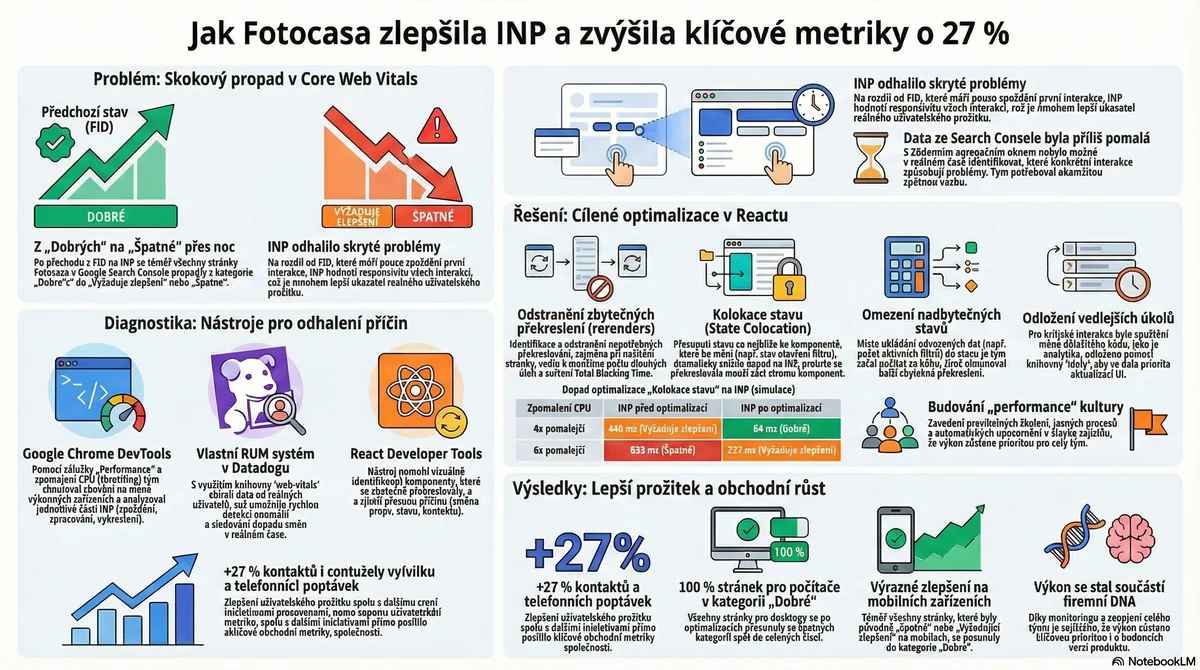
The Problem: A Sudden Drop in Core Web Vitals
Before the shift from FID to INP, almost every page on both desktop and mobile was within the "Good" threshold. However, after the shift to INP in March 2024, nearly all pages shifted to "Need improvement" and some even to "Poor", as INP values consistently exceeded 200 milliseconds.
Why INP Revealed Hidden Issues
While FID only measured the delay of the very first interaction, INP evaluates the responsiveness of all interactions, accounting for:
This broader measurement highlighted missing opportunities that FID never caught.
Diagnostic Tools Used
1. Google Chrome DevTools
The Performance tab was used to:
2. Custom RUM System in Datadog
Using the web-vitals library, Fotocasa built a real-time monitoring system to:
3. React Developer Tools
The Profiler was used to:
The Solution: Targeted React Optimizations
Removing Unnecessary Rerenders
The Fotocasa team identified two main scenarios causing unnecessary rerenders:
State Colocation
Moving state closer to where it's needed reduced the scope of rerenders. Instead of storing filter state at the top level, it was moved to the component that actually uses it.
Deferring Non-Critical Updates
For smooth UI interactions, non-critical state updates were deferred using:
startTransition for lower-priority updatesResults
| Metric | Before | After | Improvement |
|--------|--------|-------|-------------|
| INP (4x CPU) | 440 ms (Needs improvement) | 64 ms (Good) | 85% faster |
| INP (6x CPU) | 633 ms (Poor) | 222 ms (Good) | 65% faster |
| Leads/Contacts | Baseline | +27% | 27% growth |
| Desktop URLs | "Needs improvement" | 100% "Good" | 100% pass rate |
| Mobile URLs | "Poor"/"Needs improvement" | "Good" | Significant improvement |
Key Takeaways
---
> Source Attribution: This content is adapted from the case study "How improving Fotocasa's INP contributed to 27% growth in key metrics" published on web.dev under the Creative Commons Attribution 4.0 License. Original authors: Andrés Alvarez, Oriol Hilari, Nacho Rodriguez, Joan León.